Facebook Ads “Reach Your Preferred Audiences” Warning Explained: Should You Switch to Original Audience?
Kya aap bhi Facebook Ads Manager mein campaign set karte waqt ek ajeeb se popup me phas gaye hain? Jab aap Ad Set level par “Switch to Original Audience” button par click karte hain, toh Meta aapse kehta hai: “Limiting your audience may reduce performance.”
Aap akele nahi hain. Meta apne AI-driven Advantage+ algorithms ko aggressively push kar raha hai. As a digital marketing consultant with over 9 years of experience managing high-budget campaigns, main aapko exact details me bataunga ki is warning ka asli matlab kya hai, aur aapko in 3 options me se kya choose karna chahiye.
1. Ye Warning Message Kyu Aa Raha Hai?
Meta ka AI system ab pehle se kahin zyada smart ho chuka hai. Pehle hum detailed targeting (Age, Location, Interests) par depend karte the. Lekin ab, Meta ka machine learning algorithm (Advantage+) chahta hai ki aap usey “Broad Audience” dein, aur wo khud decide karega ki aapka ad kisse dikhana hai.
Reach your preferred audiences. Limiting your audience may reduce performance. Instead, consider staying in your current setup or applying value rules.
Iska simple matlab hai: Meta aapse keh raha hai, “Humein restrict mat karo. Agar aap manual options use karoge, toh aapka Cost Per Result (CPA) badh sakta hai.”
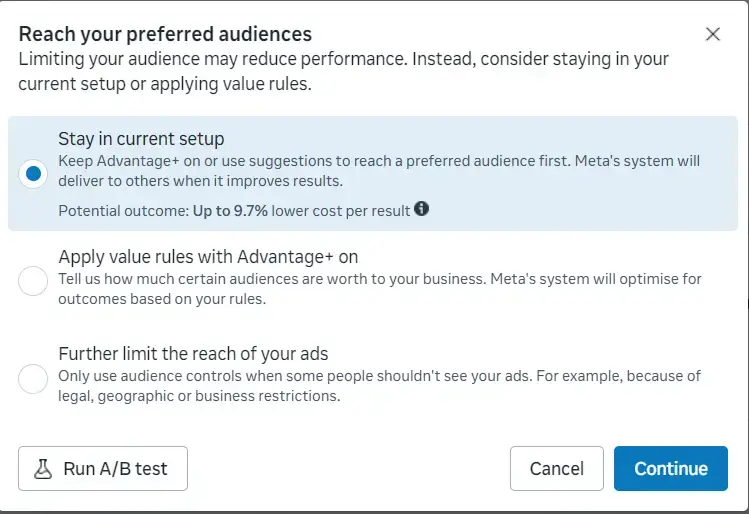
2. Option 1: Stay in current setup
Meta kya kehta hai: “Keep Advantage+ on or use suggestions to reach a preferred audience first. Meta’s system will deliver to others when it improves results. Potential outcome: Up to 9.7% lower cost per result.”
Mera Explanation: Agar aap ye option select karte hain, toh Meta aapke ad ko sabse pehle aapke diye gaye “suggestions” (agar aapne koi interest ya age suggest kiya hai) ko dikhayega. Agar usko lagta hai ki us audience ke bahar koi aur sasta conversion de sakta hai, toh wo automatically audience ko expand kar dega.
Maan lijiye aap T-shirts sell kar rahe hain. Aapne targeting me “Fashion Interest” dala. Agar Advantage+ ON hai, toh Meta pehle Fashion wale logon ko ad dikhayega. Lekin agar usey lagta hai ki koi insaan jisko “Gaming” pasand hai wo aapki T-shirt khareed sakta hai (wo bhi saste me), toh Meta automatically us gamer ko ad dikhayega. Best for: Broad products, E-commerce, Info-products.
3. Option 2: Apply value rules with Advantage+ on
Meta kya kehta hai: “Tell us how much certain audiences are worth to your business. Meta’s system will optimise for outcomes based on your rules.”
Mera Explanation: Ye sabse advanced feature hai. Isme aap Meta ko batate ho ki “Sari audience barabar nahi hoti.” Aap Meta ko specific segments ke liye “Value Multiplier” de sakte hain. Ye B2B aur high-ticket services ke liye game-changer hai.
Aap industrial fabrication ya manufacturing sectors ke liye B2B lead generation campaign chala rahe hain. Aapke paas do tarah ki audience hai: 1. General inquiries, 2. Existing ‘Custom Audience’ of Business Owners. Aap “Value Rules” me set kar sakte hain ki Business Owners ki value aapke liye 2X (dugni) hai. Meta ka AI ab Advantage+ use karega, par uski priority wo high-value business owners honge.
4. Option 3: Further limit the reach of your ads (Original Audience)
Meta kya kehta hai: “Only use audience controls when some people shouldn’t see your ads. For example, because of legal, geographic or business restrictions.”
Mera Explanation: Ye wo purana tareeqa hai jise hum saalon se use karte aa rahe hain. Agar aap ye select karte hain, toh Meta STRICTLY usi audience ko ad dikhayega jo aapne define ki hai. Wo ek inch bhi audience ko expand nahi karega. Meta isey discourage karta hai kyuki isse CPM (Cost per 1000 impressions) badh jata hai.
Maan lijiye maine Nikol, Ahmedabad mein ek Digital Marketing Institute open kiya hai. Main chahta hu ki mere ads sirf aur sirf Nikol ke 5-kilometer radius mein unhi students ko dikhein jo actually meri physical class me aa sakein. Mujhe nahi chahiye ki Meta apni marzi se Gandhinagar ya Mumbai ke logon ko mera ad dikhaye. Aisi strict local restriction ke liye hume hamesha Original Audience hi use karna chahiye.
5. Final Verdict: Aapko Kya Choose Karna Chahiye?
2026 ke digital landscape aur Meta ke current machine learning capabilities ko dekhte hue, meri recommendation ye hai:
- Scale Karna Hai (Broad Audience): Hamesha Option 1 (Advantage+) ke sath jayen. Meta ka algorithm human brain se zyada fast testing karta hai.
- High-Quality Leads Chahiye (B2B): Option 2 (Value Rules) use karein taaki kachra leads na aayein.
- Strict Local Business / Niche Hai: Tabhi Option 3 (Original Audience) par switch karein.
Pro Tip: Hamesha apni ad copy aur creative ko as a “filter” use karein. Aapka text aur video hi aapki asli targeting hai. Agar aap B2B clients dhundh rahe hain, toh creative par clearly likhein “Attention Manufacturing Business Owners”. AI apne aap samajh jayega ki ad kisse dikhana hai.